Best Free Time Tracking Apps for Freelancers in 2026
Leaking just 15 minutes of untracked client work per day can cost a freelancer over $4,000 annually. Here are the 5 best free time tracking apps that keep your billable hours accurate.
TABLE OF CONTENTS (18 SECTIONS)TAP TO EXPAND
- The True Cost of Untracked Freelance Hours
- Quick Comparison: Best Free Time Tracking Software
- 1. Toggl Track: The Gold Standard for Frictionless Tracking
- What the Free Plan Includes
- Why Freelancers Love Toggl Track
- Key Limitation
- 2. Clockify: Unrestricted Tracking and Enterprise-Grade Free Features
- What the Free Plan Includes
- Why Freelancers Love Clockify
- Key Limitation
- 3. Harvest: Integrated Time Tracking with Native Invoicing
- What the Free Plan Includes
- Why Freelancers Love Harvest
- Key Limitation
- 4. ActivityWatch: Automated, Local, Zero-Knowledge Privacy Tracking
- What It Includes
- Why Freelancers Love ActivityWatch
- How to Choose Your Free Time Tracker
The True Cost of Untracked Freelance Hours
For independent consultants and software contractors, time is your primary inventory. Yet studies across independent knowledge workers show that contractors who rely on retrospective “end-of-day” estimates leak between 10% and 25% of their billable time.
When you switch between client repositories, respond to async Slack threads, and review pull requests, unrecorded minutes rapidly compound. If you bill $100/hour and fail to track just 30 minutes of daily scope creep, you are forfeiting over $12,000 every year in earned revenue.
Using a dedicated time tracking app eliminates guesswork, builds client trust with auditable timesheets, and provides valuable data on your effective hourly rate across projects. Here are the best free time tracking tools for freelancers in 2026.
Quick Comparison: Best Free Time Tracking Software
| Tool | Free Plan Allowance | Best For | Standout Strengths | Key Limitation |
|---|---|---|---|---|
| Toggl Track | Up to 5 users, unlimited tracking & clients | Solo freelancers wanting a frictionless UI | Polished UI, idle detection, Pomodoro timer, 100+ integrations | Invoicing locked behind Starter tier ($9/user/mo) |
| Clockify | Unlimited users, projects, and reports | Freelancers needing 100% unrestricted reporting | Zero user or project caps on free tier, timesheet kiosk | Interface feels utilitarian and dense |
| Harvest | 1 seat, up to 2 active projects | Contractors who want integrated light invoicing | Built-in invoice generation with Stripe/PayPal links | Strict 2-project limit on the free tier |
| TrackingTime | Up to 3 users, unlimited tasks | Visual thinkers and calendar-based planners | Calendar timeline view, task sync with Asana/Trello | Limited advanced reporting filters on free plan |
| ActivityWatch | 100% Free & Open Source (Local) | Privacy-conscious developers & creators | Completely local, zero cloud sync, automatic app logging | No native client invoice generator or team cloud |
1. Toggl Track: The Gold Standard for Frictionless Tracking
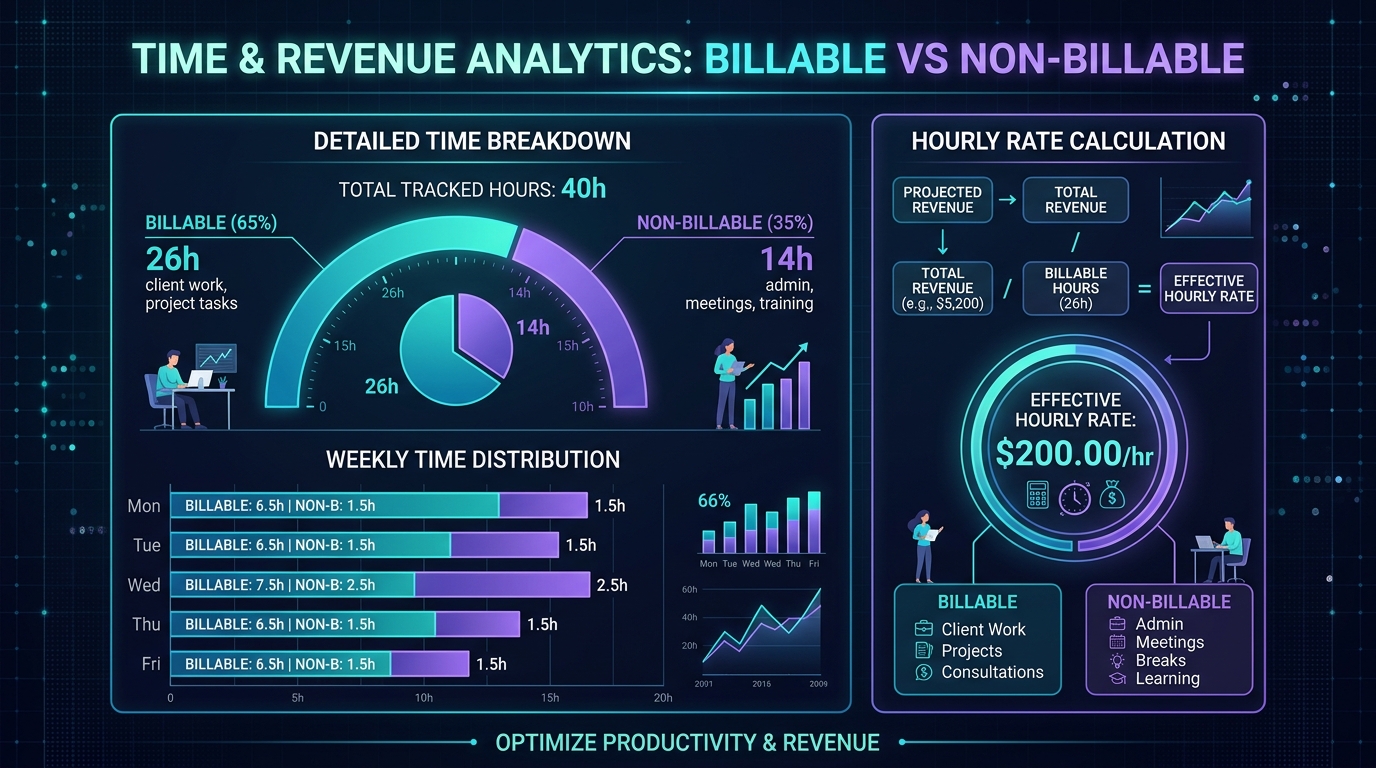 Toggl Track delivers detailed breakdowns of billable versus administrative hours across clients.
Toggl Track is widely recognized as the benchmark for intuitive, lightweight time tracking. Its clean design and keyboard-friendly architecture ensure that starting a timer never disrupts your focus.
What the Free Plan Includes
- Unlimited Time Tracking: No caps on how many hours, days, or months of logs you record.
- Unlimited Projects & Clients: Organize your work cleanly across distinct client retainers.
- Up to 5 Workspace Users: Add subcontractors or design partners at no extra cost.
- Desktop & Mobile Apps: Native apps for macOS, Windows, Linux, iOS, and Android.
- Idle Time Detection: Automatically prompts you if you step away from your keyboard while a timer is active, allowing you to discard or keep the inactive duration.
Why Freelancers Love Toggl Track
Toggl Track excels at micro-interactions. The browser extension places a discreet “Start Timer” button directly inside tools like GitHub, Linear, Trello, and Notion. Furthermore, if you use productivity command bars like Raycast Pro for macOS productivity, you can start and stop Toggl timers directly from your keyboard without opening a browser window.
Key Limitation
Toggl Track reserves native invoicing and automated reminder alerts for its paid tiers ($9/user/month). However, its CSV export can be easily paired with your external billing tool.
2. Clockify: Unrestricted Tracking and Enterprise-Grade Free Features
If you want completely unrestricted reporting without any project or collaborator ceilings, Clockify is the most generous free-tier platform available.
What the Free Plan Includes
- Unlimited Users, Projects, & Clients: Track time across dozens of active client accounts without running into arbitrary paywalls.
- Timesheet & Stopwatch Modes: Enter time live with a stopwatch or fill out weekly grid timesheets.
- Custom Billable Rates: Set default hourly rates to monitor earned revenue in real time.
- Summary & Detailed Exports: Export high-resolution PDF summaries, Excel spreadsheets, or CSV data for accountant review.
Why Freelancers Love Clockify
Clockify never holds your data hostage. You can create complex project structures, assign custom tags (e.g., Frontend, DevOps, Meeting), and generate comprehensive quarterly reports. For international freelancers collecting payments through cross-border payment platforms like Wise Business or Stripe, Clockify provides the exact breakdown needed to back up itemized invoices.
Key Limitation
Clockify’s interface is more utilitarian and dense than Toggl Track. It feels like an enterprise timesheet tool rather than a minimalist creative utility.
3. Harvest: Integrated Time Tracking with Native Invoicing
Harvest takes a different approach by tightly integrating your logged hours with professional client invoices and expense tracking.
What the Free Plan Includes
- 1 User Account: Perfect for solo freelancers.
- Up to 2 Active Projects: Track time against 2 concurrent client deliverables.
- Native Invoicing: Convert your recorded billable hours directly into web invoices with integrated Stripe and PayPal payment links.
- Expense Tracking: Attach receipts and track reimbursable project expenses alongside hourly logs.
Why Freelancers Love Harvest
If you only manage one or two major client retainers at a time, Harvest offers a seamless workflow. When a billing cycle ends, you can generate a professional invoice with one click, send it directly to the client, and track when it is viewed and paid.
Key Limitation
The 2-project limit on the free tier is very restrictive. If you frequently juggle 4 or 5 simultaneous micro-contracts, you will need to constantly archive completed projects or upgrade to the paid plan ($10.80/month).
4. ActivityWatch: Automated, Local, Zero-Knowledge Privacy Tracking
For software developers, security researchers, and privacy-conscious freelancers who dislike cloud trackers, ActivityWatch is an open-source marvel.
What It Includes
- 100% Open Source & Free: No subscriptions, telemetry, or hidden upgrades.
- Automatic Background Tracking: Automatically records which application, code editor, browser tab, or document you are actively using.
- Local SQLite Database: All tracked telemetry remains encrypted on your local machine; nothing is sent to external servers.
- Custom Category Rules: Create regex rules to classify time spent in specific GitHub repositories or client directories automatically.
Why Freelancers Love ActivityWatch
ActivityWatch requires zero manual stopwatch toggling. At the end of the day, you can review an exact chronological timeline of your workstation activity and transfer your billable totals into your client invoice.
How to Choose Your Free Time Tracker
- For the smoothest daily experience: Pick Toggl Track for its unmatched UI speed, idle detection, and deep extension ecosystem.
- For zero feature limits and complex reporting: Pick Clockify if you manage numerous client accounts and need unrestricted data exports.
- For built-in invoicing on a single retainer: Pick Harvest if you only have 1 or 2 clients and want one-click billing.
- For total privacy and automated tracking: Pick ActivityWatch to log workstation activity locally without third-party cloud synchronization.
Pair your time tracking data with a clean task board from our guide to the best free project management tools for freelancers to build a disciplined, leak-free operational stack.
WHAT WE APPRECIATED (PROS)
- ✓One-click desktop, web, and mobile stopwatch timers
- ✓Granular tagging by client, project, and billable status
- ✓Automated idle detection and Pomodoro focus intervals
- ✓Clean PDF and CSV timesheet exports formatted for client invoices
DRAWBACKS & FRICTION (CONS)
- ✕Automated invoicing and scheduled billable alerts often require paid tiers
- ✕Some free plans limit the historical data retention window
- ✕Manual time entry requires personal discipline to avoid tracking gaps
Best Free Time Tracking Apps for Freelancers in 2026 Rating Breakdown
Hourly contractors, technical consultants, and agency freelancers who need transparent, auditable time logs for client invoices.
Toggl Track delivers the most polished and intuitive single-click timer experience on the web and desktop, while Clockify offers completely unrestricted free project and client reporting. For automated, privacy-first local tracking, ActivityWatch provides a powerful open-source alternative.
EVALUATION METRICS
Speed of setup, friction in daily operations, and intuitive mental model for non-enterprise users.
Utility of capabilities without unnecessary enterprise bloat that slows down solo execution.
Return on investment for a single seat, clear billing tiers, and fair feature gates.
Uptime track record, offline resilience, and friction-free portable data export.
Specific suitability for client collaboration, single-seat economics, and lean overhead.
Frequently Asked Questions
Why do freelancers need a dedicated time tracker instead of a simple spreadsheet?+
Dedicated time tracking apps eliminate human estimation errors. Features like idle detection, browser extensions, and one-click desktop hotkeys ensure that micro-tasks (like answering a 10-minute client Slack message or debugging a staging server) are captured accurately and billed accordingly.
Which free time tracker generates the best reports for client invoices?+
Toggl Track and Clockify both generate clean, professional PDF and CSV reports grouped by client, project, and date. You can attach these export summaries directly to your international invoices.
Can I track time offline when working without an internet connection?+
Yes. Toggl Track, Clockify, and ActivityWatch all support full offline tracking. Timers running locally will automatically sync your time entries to the cloud once your connection is restored.

Freelance Tool Guide Team
The editorial team behind Freelance Tool Guide, independently researching and testing software for freelancers and small teams.
More Independent Software Analyses
Wise Business vs Stripe: The Hidden Costs of Cross-Border Freelance Invoicing
How international transaction fees and currency markups quietly siphon thousands from remote freelancers. A detailed fee audit and workflow guide.
Raycast Pro Review: The Essential macOS Command Center for Freelancers
How Raycast replaces Alfred, Rectangle, Paste, and native AI assistants in a single, blazing-fast macOS application. Full freelance testing and setup guide.
Best Free Project Management Tools for Freelancers in 2026
Looking for zero-cost project tracking? We break down the best free project management software for solo freelancers, comparing limits, boards, and client workflows.